
 By Mikel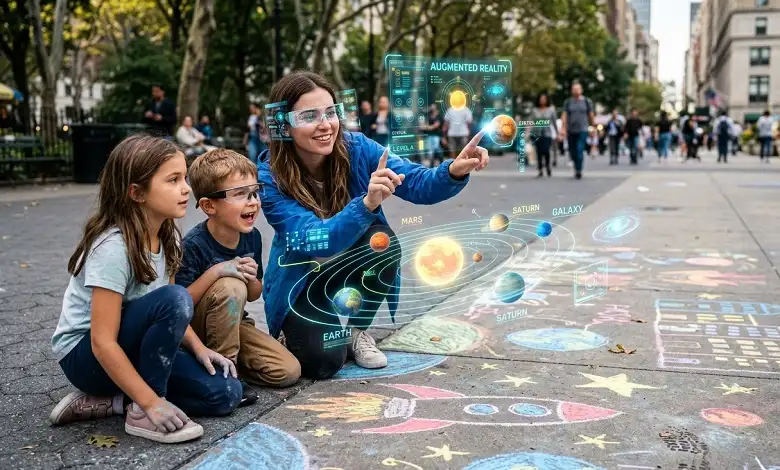
Chalk augmented reality brings the simplicity of drawing a line, arrow, circle, or note into a digital environment. Instead of using physical chalk to mark a wall, floor, field, or object, augmented reality can place a digital mark over the real world and allow people to view it through a compatible device.
The idea is simple, but its applications can be surprisingly practical. Temporary visual instructions can be useful in classrooms, construction projects, sports training, maintenance, design, events, and interactive experiences. Because the markings are digital, they can be changed or removed without physically altering the surface.
For businesses, educators, designers, and developers exploring AR, understanding how this approach works—and where it actually provides value—is more important than simply treating it as a visual novelty.
What Is Chalk Augmented Reality?
Chalk augmented reality is best understood as a digital annotation layer placed over a real-world environment.
Traditional chalk is useful because it communicates information directly where an activity is happening. A teacher can draw a diagram on a board, a coach can sketch a play on a field, or a construction worker can mark a location on a surface.
An AR system can create a similar experience digitally. Instead of leaving a physical mark, the user sees a virtual line, drawing, arrow, label, or instruction positioned within the environment.
For example, an AR application could show a virtual line on a floor to indicate where equipment should be installed. A training application could draw movement paths on a playing surface. A museum experience could place digital explanations beside an object without putting a physical sign next to it.
The marking is virtual, but its purpose is very real: helping people understand something in the context of where they are standing.
How Does Chalk-Style AR Work?
Although individual AR applications use different technologies, most rely on a combination of cameras, sensors, software, and spatial tracking.
A typical experience follows several basic steps:
- The device observes the surroundings. A camera and other sensors collect information about the environment.
- The software identifies surfaces or features. The system may detect a floor, wall, object, or other recognizable point.
- Digital content is positioned in the environment. The application places the virtual marking at a chosen location.
- The marking is anchored to that location. As the user moves, the software attempts to keep the digital content aligned with the real-world environment.
- The user interacts with the information. Depending on the application, markings may be moved, edited, selected, or combined with other digital content.
Modern AR platforms can use technologies such as computer vision, motion tracking, depth sensing, and spatial mapping to make this possible.
The quality of the experience depends heavily on the device and software. Good tracking can make a virtual marking appear attached to a physical surface, while poor tracking can cause it to drift or jump.
Chalk AR vs. Traditional Chalk
The biggest difference is permanence and flexibility.
Physical chalk creates a visible mark directly on a surface. It is inexpensive and does not require specialized hardware, but it can be messy, difficult to update, and unsuitable for some environments.
Digital AR markings do not physically change the surface. They can potentially be edited, hidden, duplicated, or updated through software.
| Traditional Chalk | Chalk-Style AR |
| Physically marks a surface | Creates a digital overlay |
| Easy and inexpensive | Requires compatible technology |
| Usually visible to everyone nearby | Usually visible through an AR device |
| Can be erased manually | Can be removed digitally |
| Limited to the physical surface | Can include interactive information |
| No tracking required | May require spatial tracking |
This does not mean AR is automatically better. For a simple classroom diagram or temporary sports instruction, real chalk may still be the most practical option. AR becomes more valuable when the information needs to be interactive, contextual, changeable, or connected to digital data.
Why Is Chalk Augmented Reality Useful?
The strength of this approach is context.
People often understand instructions more quickly when the information appears where they need to use it. A written instruction saying “install the component 30 centimetres from the edge” requires the user to mentally translate the information into the physical environment.
An AR overlay could potentially show the location directly.
This principle can be applied to many situations:
- Showing where an object should be positioned
- Drawing routes or movement paths
- Highlighting equipment or components
- Adding measurements to physical objects
- Providing step-by-step instructions
- Explaining complex structures
- Creating interactive learning experiences
- Guiding visitors through a physical location
The goal is not simply to make information look futuristic. The goal is to connect digital information with the physical thing being discussed.
Chalk Augmented Reality in Education
Education is one area where digital annotations can make physical learning more visual.
Imagine a science lesson in which students point an AR-enabled device at a model and see labels appear over different parts. In mathematics, virtual lines and shapes could be placed on physical surfaces. In geography, digital information could be displayed over a physical map.
A chalk-style visual language can make these experiences easier to understand because people already recognize arrows, circles, underlines, and diagrams as teaching tools.
However, AR should support teaching rather than replace good instruction. A complicated AR experience can distract students if the technology becomes more noticeable than the lesson itself.
Construction, Architecture, and Interior Design
Construction and design provide particularly practical applications for spatial AR.
Before making a physical change, a team may want to visualize where something will go. Digital markings can potentially show proposed walls, equipment locations, measurements, pathways, or design elements.
For example, an architect could use AR to help a client visualize a proposed layout inside an existing space. A construction team could use digital reference points while reviewing a project. An interior designer could demonstrate potential furniture placement without physically moving every item.
The major advantage is that digital information can be adjusted without repainting or permanently marking the environment.
For professional projects, however, AR should be treated as a visualization or guidance tool unless the particular system has been properly validated for measurement or engineering purposes.
Maintenance and Technical Training
Maintenance work often involves following instructions while looking at a physical machine or system.
An AR application could place an arrow over the relevant component and provide additional information nearby. Instead of constantly switching between a manual and the equipment, the worker could receive contextual instructions through the AR interface.
Potential applications include:
- Equipment identification
- Inspection guidance
- Component labelling
- Assembly instructions
- Training simulations
- Repair procedures
- Safety reminders
The usefulness depends on the accuracy of the underlying information. A digital overlay is only as reliable as the data and instructions behind it, which makes proper testing and professional oversight important in safety-critical environments.
Sports and Performance Training
Coaches have been drawing plays and movement patterns for decades. AR can turn that familiar concept into a digital experience.
A coach could potentially create virtual routes, positions, or movement patterns on a field or court. Players could then view those instructions in the context of the playing area.
The advantage is flexibility. Different plays or drills can be displayed without repeatedly drawing and removing physical markings.
The same concept could be applied to rehabilitation exercises, fitness instruction, dance practice, and other forms of movement training, provided the application is designed and validated appropriately.
Museums, Tourism, and Interactive Experiences
AR can also add information to places without changing their physical appearance.
A museum could use digital annotations to explain an artifact. A historic location could provide additional context about a building or event. An exhibition could use virtual arrows and drawings to guide visitors through an interactive installation.
Chalk-style graphics can work particularly well because they can make digital instructions feel informal and approachable.
Instead of replacing the physical environment, the technology adds another layer of information to it.
What Are the Benefits of Chalk-Style AR?
The potential benefits depend on the application, but several characteristics make this approach useful.
Temporary Information
Digital markings can be displayed when needed and removed afterward, without leaving a physical mark.
Easy Updates
If instructions or layouts change, software can potentially update the digital content without repainting or replacing physical signs.
Contextual Guidance
Information can appear next to the object, surface, or location it refers to, reducing the need to interpret separate instructions.
Interactive Content
Unlike ordinary chalk, AR can connect a visual marking to additional digital information, animations, menus, or other interactions.
Visual Communication
Lines, arrows, circles, and diagrams can communicate spatial information quickly, particularly when explaining something that is difficult to describe using words alone.
What Are the Limitations?
AR is not a universal replacement for physical signs or chalk.
Hardware requirements can be a barrier. Users need a compatible smartphone, tablet, headset, or other AR-capable device.
Tracking accuracy is another important consideration. Digital markings need to remain properly aligned with the environment, and performance can vary depending on lighting, surfaces, movement, and device capabilities.
User experience also matters. Asking someone to hold up a phone for a simple instruction may be less convenient than using a conventional sign.
There are also concerns around privacy and data collection when applications use cameras, location information, or spatial data.
For professional environments, accuracy and reliability should be tested rather than assumed simply because information is displayed through AR.
What Do You Need to Create a Chalk AR Experience?
The exact requirements depend on the complexity of the project.
A basic experience may require:
- An AR-capable smartphone or tablet
- An AR development platform
- 3D or 2D digital assets
- Surface or image tracking
- An application or AR viewer
- A method for positioning and updating digital annotations
More advanced systems may use depth sensors, spatial mapping, cloud-based content management, 3D models, computer vision, or specialized AR headsets.
For a simple demonstration, a smartphone-based experience may be sufficient. Enterprise applications usually require considerably more planning, testing, and integration.
Is Chalk Augmented Reality the Future of Visual Communication?
AR is unlikely to eliminate traditional methods such as signs, diagrams, whiteboards, or physical markings. Those tools remain inexpensive, familiar, and effective.
The more realistic opportunity is for AR to complement them.
When information is temporary, spatial, interactive, or frequently updated, a digital overlay can offer advantages that a physical mark cannot. As AR hardware becomes more capable and software becomes easier to use, these applications may become increasingly practical.
The most successful experiences will probably be the ones where AR solves a genuine communication problem rather than being used simply because the technology is available.
Final Thoughts
Chalk augmented reality takes a familiar form of communication—drawing directly where something is happening—and combines it with digital technology.
Its value is not really in making virtual drawings look like chalk. The more important idea is spatial communication: putting useful information directly into the environment where people need to understand or act on it.
From classrooms and sports fields to construction sites, museums, maintenance environments, and design projects, this approach can make certain types of information easier to visualize.
At the same time, AR has practical limitations involving hardware, tracking, usability, privacy, and accuracy. The best applications will therefore be those that use AR for a clear purpose and provide something that a conventional mark, diagram, or sign cannot provide as effectively.
As spatial computing continues to develop, simple digital annotations may become one of the most practical ways to connect information with the physical world.
Frequently Asked Questions
A. It generally refers to using augmented reality to create virtual, chalk-like markings or annotations within a real-world environment. These can include lines, arrows, drawings, labels, or instructions.
A. Not exactly. Augmented reality is the broader technology. Chalk-style AR is a particular way of using AR to communicate information through virtual markings or annotations.
A. That depends on the AR system. Applications typically need to recognize or track suitable surfaces, and performance can vary based on lighting, texture, movement, and device capabilities.
A. Potentially, yes. Depending on the application, users may be able to move, edit, select, erase, or interact with digital markings and connect them to other information.
A. Not necessarily. Physical chalk is still simpler and more affordable for many situations. AR becomes more useful when markings need to be temporary, interactive, location-specific, or connected to digital information.